SAMS Odisha Portal: Registration, Student Login & Merit List
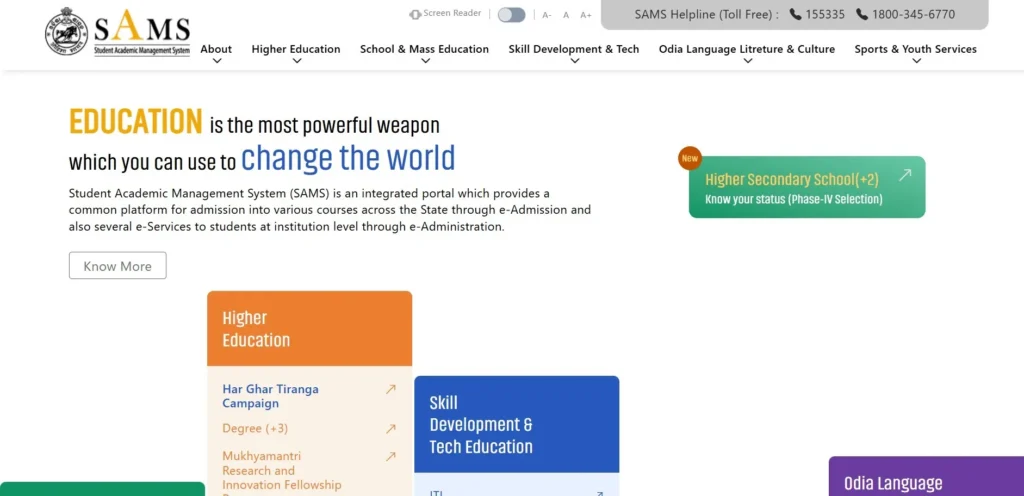
Odisha’s official e-Admission platform managed by the Department of Higher Education, Government of Odisha. Apply for +2, +3 Degree, PG (CPET), B.Ed, ITI, Polytechnic and Teacher Education courses — all through one Common Application Form (CAF) at samsodisha.gov.in.
Quick-access portal directory
SAMS Odisha 2026–27 Important Dates — Full Admission Calendar
| Event | Date (2026) | Course |
|---|---|---|
| CPET registration opens | 27 February 2026 | PG / CPET |
| CPET registration closes | 15 March 2026 | PG / CPET |
| CPET entrance exam | 27 April – 10 May 2026 | PG / CPET |
| B.Ed admit card release | 27 May 2026 | B.Ed (IMED) |
| B.Ed entrance exam | 31 May 2026 | B.Ed (IMED) |
| +2 / +3 CAF window opens | May 2026 | +2 & +3 |
| +2 / +3 CAF window closes | June 2026 | +2 & +3 |
| Merit list — 1st selection | June 2026 | All courses |
| Merit list — 2nd selection | July 2026 | All courses |
| Merit list — 3rd selection | July – August 2026 | All courses |
| Spot admission period | August – September 2026 | Remaining seats |
What is SAMS Odisha? The Complete Answer
SAMS Odisha — full name: Student Academic Management System — is Odisha’s official centralised e-Admission platform, developed and operated by the Department of Higher Education, Government of Odisha, with technical infrastructure support from OCAC (Odisha Computer Application Centre). Launched in 2009 as a pilot programme in 60 junior colleges, it now manages admissions across 4,000+ institutions and handles approximately 15 lakh (1.5 million) student applications per year. Similar to platforms like aktu erp, it streamlines and centralises academic admission processes at scale.
How SAMS Odisha Was Built — From 60 Colleges to 4,000+ Institutions
- 2009–10: Pilot launched in 60 junior (+2) colleges
- 2010–11: Expanded to 169 junior colleges + 53 degree colleges
- 2011–12: All junior colleges + 162 degree colleges brought onto the platform
- 2014–15 onwards: ITI, Polytechnic, Teacher Education, and Physical Education courses added
- Present: 4 government departments · 4,000+ institutions · 8 lakh seats · 15 lakh applicants annually
National recognition received by SAMS Odisha:
- SKOCH Governance Award (2015 & 2018)
- Gold Award — Outstanding Citizen Centric Service Delivery (National e-Gov Conference 2012–13)
- CSI Nihilent e-India Jury Award — Best Government Policy Initiative (2009)
- Indian Express Tech Sabha Award (Government technology category)
The Two Pillars of SAMS — e-Admission and e-Administration
e-Admission module
Centralised online application via Common Application Form (CAF).
Merit-based seat allocation using board marks, reservation quotas, and NCC/Sports weightage.
Multi-round selection: 1st, 2nd, 3rd selections + Spot Admission.
Online fee payment and digital Intimation Letter generation.
CAF Auto-Validation via CHSE Roll Number and Caste Barcode verification.
e-Administration module
Post-admission management and student ID card generation.
Exam admit card issuance and exam form submission.
Scholarship application and disbursal linked to Samagra Portal.
Academic records managed in Academic Bank of Credits (ABC).
Student performance tracking across the academic lifecycle.
Every course covered under SAMS Odisha — complete list
| Course level | Course names | Duration | Qualifying exam | Official portal |
|---|---|---|---|---|
| +2 Higher Secondary | Arts, Science, Commerce, Vocational, Sanskrit | 2 years | Class 10 (BSE Odisha) | hss.samsodisha.gov.in |
| +3 Degree | BA, BSc, BCom (Honours & Pass) | 3 years | Class 12 (CHSE Odisha) | degree.samsodisha.gov.in |
| PG / CPET | MA, MSc, MCom, MBA, MCA and others | 2 years | Bachelor’s degree + CPET | pg.samsodisha.gov.in |
| Teacher Education | B.Ed, B.H.Ed, M.Ed, D.El.Ed (CT) | 1–2 years | Bachelor’s / Master’s degree | te.samsodisha.gov.in |
| Physical Education | B.P.Ed, M.P.Ed | 1–2 years | Degree + physical fitness | te.samsodisha.gov.in |
| ITI | Various trades | 1–2 years | Class 8 / Class 10 | imed.samsodisha.gov.in |
| Polytechnic / Diploma | Technical courses | 3 years | Class 10 | imed.samsodisha.gov.in |
| Sanskrit | Upashastri, Shastri | 2–3 years | Class 10 / Class 12 | hss.samsodisha.gov.in |
| Correspondence | Various | Varies | Varies | samsodisha.gov.in |
How to register on SAMS Odisha 2026 — step-by-step for all courses
Registration is the mandatory first step before you can fill the CAF, choose colleges, or check your merit list. You cannot access any SAMS service without completing registration first. The process takes under 10 minutes. Here is exactly how to complete it — for every course type.
What you need before registering
- A mobile number you will keep active for the entire admission cycle — all OTPs and notifications arrive here
- A valid email address for confirmation and updates
- Class 10 marksheet (for +2 applicants) or Class 12 marksheet (for +3, B.Ed, or PG applicants)
- Passport-size photo in JPG format, under 100KB, white background
- Signature scan in JPG format, under 50KB
- Caste certificate, if applying under SC, ST, or SEBC reservation
The “one student, one account” rule: SAMS strictly prevents duplicate registrations. Attempting to register twice with the same mobile number or email triggers an automatic CAF Rejection flag on both accounts. Always use your own permanent mobile number. If you already have an account from a previous year, use the Forgot Password option — do not create a new account.
SAMS registration steps — new student account creation
- Open the correct portal for your course.
- Click “New Student Registration”: The button is on the portal homepage.
- Enter your details: full name as on your marksheet, date of birth, mobile number, and email address.
- Click “Generate OTP”: An OTP arrives within 60 seconds. If it does not arrive: check that your mobile is not in DND mode, check signal, then click Resend OTP after the 60-second timer ends.
- Enter the OTP and click Submit: One attempt per OTP — request a new code if you mistype.
- Create your password: Use letters, numbers, and at least one special character. Do not use your name or date of birth as the password.
- Log in immediately. Confirm your account is active by signing in once.
- Save your Reference Number: Screenshot the confirmation page. You will need this number for every future SAMS interaction — including document downloads and helpdesk requests.
5 common registration errors — exact fixes
- OTP not received
- Fix: Check DND status by dialling 1909. Make sure mobile signal is active. Request a resend only after the 60-second timer ends.
- “Mobile number already registered”
- Fix: You already have a SAMS account. Use Forgot Password instead of creating a new registration.
- Photo upload failure
- Fix: The file must be JPG and under 100KB. Compress it using any free online tool if larger. PNG files are not accepted.
- CAPTCHA not displaying
- Fix: Clear browser cache (Ctrl+Shift+Delete), switch to Google Chrome or Microsoft Edge, or open an Incognito window.
- Session timeout
- Fix: The portal logs you out after inactivity. Apply during off-peak hours — before 8AM or after 9PM — when server load is lower.
SAMS Odisha Student Login — Find Your Portal and Fix Any Login Error
There are six separate SAMS login portals — one for each course type. Using the wrong portal is the most common reason students cannot log in at all. Find your course in the portal directory (Section 2) and use only the verified .gov.in URL. If you are on the right portal and still cannot log in, the fix is almost always one of five issues — all listed below.
Login steps — works for all SAMS portals
- Open your correct portal
- Click “Existing Student Login.” The button is on the portal homepage.
- Enter your mobile number as a username—10 digits only — no 0 prefix, no +91 prefix.
- Enter your password Case-sensitive — enter it exactly as created.
- Complete the CAPTCHA Type the code shown on screen.
- Click Login You are now on your e-Space dashboard.
From your e-Space dashboard you can: Check CAF status, view selection status, download the Intimation Letter, pay admission fees, access scholarship application links, and download admit cards (for B.Ed candidates). Your login credentials stay the same across all rounds of the admission cycle. Do not create a new account for each round.
Forgot your SAMS password? Recover it in 3 steps
- Click “Forgot Password?”The link is directly below the login form.
- Enter registered mobile number and date of birthThese must match the details on your original registration.
- Enter the OTP and create a new passwordThe OTP is sent to your registered mobile number.
If you no longer have access to your registered mobile number: Call the SAMS Helpdesk at 1545 or 1800-891-4416 (toll-free, 8AM–8PM, working days). Keep your Reference Number and a government-issued ID ready before calling.
SAMS Odisha Merit List 2026–27 — 1st, 2nd & 3rd Selection Lists + Spot Admission
Current status: 1st Selection List for +2 and +3 — [Status: Live / Expected: July 2026]. Check your selection status →
The SAMS Odisha merit list is a ranked selection list published by the Department of Higher Education after each application deadline closes. Selection is fully automated — calculated using the student’s board exam marks, reservation category, NCC/Sports weightage claimed in the CAF, and the order of college preferences submitted.
How to Check and Download Your SAMS Merit list — Exact Steps
- Open your course portal:
hss.samsodisha.gov.infor +2,degree.samsodisha.gov.infor +3,pg.samsodisha.gov.infor PG. - Click “Know Your Selection Status” or “Merit List” on the homepage.
- Log in with your mobile number and password.
- Your status appears: Selected / Not Selected / Waitlisted.
- If selected, click “Download Intimation Letter.”
- Print two copies — submit one at the allotted college, keep one.
- Report to the college within the deadline shown on your Intimation Letter.
Your Intimation Letter contains the allotted college name, course, stream, reporting date, and a checklist of required original documents.
All four selection rounds — what happens in each
- Round 1 (First Selection List). Published in July (exact date in Section 3 calendar). Students who are selected have 4–5 days to report to the allotted institution. At this point, you choose one of three options: Freeze, Slide, or Float (see next section for the decision guide).
- Round 2 (Second Selection List). Students who opted Slide or Float in Round 1 are re-evaluated. Also covers students not selected in Round 1 if seats become available. Before Round 2 opens, students must submit the Slide-Up Option Form online — failure to submit means you lose your slide eligibility. Differential fees may apply when moving to a higher-fee college.
- Round 3 (Third Selection List). Final regular selection round. Students who were waitlisted or who slid in Round 2 participate. After Round 3, cut-offs finalise for the season.
Spot Admission. Conducted after Round 3 for vacant seats that remain unfilled. Open to all non-admitted students from the merit pool. Some Spot rounds require physical presence at specific colleges — check the DHE Odisha notification for the exact process each year.
Freeze, Slide, or Float — which should you choose?
- Choose FREEZE if you are completely satisfied with your allotted college and course. Freezing permanently secures your seat and removes you from all future rounds. You pay the admission fee, download your Intimation Letter, and report to the college — your admission is confirmed.
- Choose SLIDE if you have been allotted a college but want to move to a higher-preference college from your CAF list in Round 2. You keep your current seat as a fallback — if you don’t move up in Round 2, you retain the original allotment. Note: if your allotment is your CAF Option 1 (first choice), Slide is not available — you cannot go higher.
- Choose FLOAT if you want to stay at the same college but want to move to a more preferred subject or Honours combination within it. Useful when you want the college but not the current subject allocation.
Annexure-7: If you do not want to participate in Slide-Up at all, you must submit Annexure-7 online before the Slide window closes. Submitting this form permanently removes you from future round consideration — only submit if you are certain.
SAMS Odisha cut-off marks 2026 — district-wise trends
Cut-offs in SAMS are not published as a fixed number — they represent the marks of the last student selected in a given round at a given college. The cut-off for Round 1 is always the highest; it drops in subsequent rounds.
2025 reference cut-off patterns (for 2026 guidance):
- High-competition districts — Khordha (Bhubaneswar area) and Cuttack: General category Science cut-offs at top colleges (BJB Higher Secondary, Ravenshaw University) regularly exceed 90% at Round 1.
- Moderate competition — Ganjam, Sambalpur, Balasore: General Science typically 75–85%.
- Lower competition — Angul, Jajpur, Deogarh: Accessible at 60–75%.
SEBC note: The 11.25% SEBC reservation (introduced 2025–26) has increased reserved seats significantly. SEBC students should check their category-specific cut-offs — these are meaningfully lower than General category cut-offs at the same institution.
SAMS Odisha B.Ed 2026 — Application Form, Exam Date, Admit Card, Result & Seat Allotment
The SAMS Odisha B.Ed entrance examination is conducted annually by the Department of Higher Education, Government of Odisha, through the State Selection Board (SSB), for admission to the 2-year B.Ed, B.H.Ed, and 2-year M.Ed programmes at Teacher Education Institutions (TEIs) across Odisha. Applications are submitted exclusively through te.samsodisha.gov.in.
B.Ed 2026 — complete official timeline
| Event | Date (2026) |
|---|---|
| Application form released | March 23, 2026 |
| Last date to apply online | April 6, 2026 (11:45 PM) |
| Application correction window | April 7, 2026 |
| Data submission to SSB | April 13, 2026 |
| Admit card release | May 27, 2026 (2:00 PM) |
| Entrance exam | May 31, 2026 |
| Provisional answer key | June 4, 2026 |
| Objection window | June 5–7, 2026 |
| Final answer key | June 9, 2026 |
| Result declaration | June 2026 |
| Allotment list | July 2026 |
B.Ed eligibility — who can apply
- Arts / Science / Humanities / Commerce graduates: Bachelor’s or Master’s degree with minimum 50% aggregate marks (45% for SC/ST/SEBC/PwD candidates).
- Engineering / Technology graduates: Minimum 55% aggregate (50% for SC/ST/SEBC/PwD) with specialisation in Science and Mathematics with methods/elective.
- Final-year students: May apply provisionally — graduation certificate must be submitted before admission confirmation.
- Domicile: Indian citizen, permanent resident of Odisha as per state government norms.
- Age limit: Per DHE Odisha brochure — with relaxations for SC/ST/SEBC/Women/PwD as notified.
B.Ed exam pattern — 100 marks, 2 hours, OMR
| Parameter | Details |
|---|---|
| Total questions | 100 MCQs |
| Total marks | 100 |
| Duration | 120 minutes |
| Mode | Offline (OMR sheet) |
| Correct answer | +1 mark |
| Wrong answer | −0.25 marks (negative marking) |
| Section 1 (40 marks) | General Awareness, English, Reasoning, Teaching Aptitude — common for all |
| Section 2 (60 marks) | Subject-specific (Science/Arts stream as applicable) |
SAMS Odisha PG Admission 2026 — CPET Exam, Registration, Merit List & Seat Allotment Guide
Postgraduate admissions in Odisha are conducted through the Common PG Entrance Test (CPET), managed by the Department of Higher Education via pg.samsodisha.gov.in. CPET is the mandatory entrance examination for admission to MA, MSc, MCom, MBA, MCA, and other PG programmes at state public universities and affiliated colleges. The 2026 CPET examination was conducted from April 27 to May 10, 2026, across multiple centres.
CPET 2026 key dates
| Event | Date |
|---|---|
| Registration window | February 27 – March 15, 2026 |
| Examination | April 27 – May 10, 2026 |
| Result | June 2026 (pg.samsodisha.gov.in) |
| CPET merit list | July 2026 |
| Seat allotment (provisional) | July 2026 |
| Document verification at HEI | July 2026 |
| Spot Admission (vacant seats) | After regular rounds |
CPET eligibility — who can apply for SAMS PG
- General category: Bachelor’s degree from a UGC-recognised university with minimum 50% aggregate marks.
- SC/ST category: Minimum 45% aggregate in Bachelor’s degree.
- Subject requirement: Applicants must have a minimum of 24 credits in the relevant elective subject at the undergraduate level for the corresponding PG course. For example, to apply for MA History, you must have studied History as an elective with at least 24 UG credits.
- Final-year students: May apply provisionally. Graduation certificate must be submitted before the final admission deadline.
- Fee exemptions: No application fee for PwD candidates and third-gender candidates.
How to fill the SAMS Odisha CAF — step-by-step + smart college choice strategy
The CAF is the most consequential form in your admission cycle. An incorrectly ordered preference list can cost you your preferred college — even when your marks were high enough to qualify. This section walks you through filling the CAF correctly, then explains the strategy behind choosing and ordering your college preferences.
CAF rules — what you must know before starting
- You can select a minimum of 5 and maximum of 20 college-course-stream combinations (called “Options”).
- Each Option is a unique combination of Institution + Stream + Honours subject.
- CAF fee: ₹300 (General), ₹200 (SC/ST), typically free for PwD — payable online only, non-refundable.
- CAF 2.0 auto-validation: if your CHSE Roll Number and Caste Barcode match government records, your form is validated automatically — no physical visit to a Resource Centre is needed.
- After payment, the CAF is permanently locked. No changes to college preferences can be made after successful fee payment. Double-check everything before clicking pay.
- A Reference Number is generated on submission. Screenshot it and save it in two separate places — you will need it for every future SAMS interaction.
Smart CAF choice strategy — how to rank your preferences
- Put your absolute first-choice college as Option 1. If selected for Option 1, Slide-Up is not available — there is nothing higher to move to.
- Place “stretch” colleges (the ones you want but aren’t certain of) at positions 2–5. If you qualify for them in Round 2 via Slide-Up, you will get them. If you don’t, Options 6–20 are your safety net.
- Use all 20 options. More options mean more chances in the Slide rounds. Students who submit only 5 options have much lower chances in Rounds 2 and 3.
- Research 2025 Round 2 cut-offs for your target colleges. The 2026 Round 1 cut-off is typically 1–2% higher than the 2025 Round 2 cut-off — use this as your realistic baseline.
- Include at least 3–4 lower-competition colleges at positions 17–20 as genuine safety options. A seat at a comfortable college is better than no seat after 3 rounds.
SAMS Odisha scholarships 2026 — Medhabruti, Prerana & Vyasakabi: who qualifies and how to apply
Once your SAMS admission is confirmed, your student profile links automatically to the Odisha State Scholarship Portal (scholarship.odisha.gov.in) through the Samagra integration. Three scholarship schemes are available to SAMS-admitted students: Medhabruti (merit-based, all categories), Prerana (post-matric, for SC/ST/OBC/SEBC students), and Vyasakabi Fakir Mohan Bhasabruti (for Odia language pursuers). Each scheme has different eligibility criteria, application steps, and disbursement timelines.
Medhabruti scholarship — merit-based aid for +2, +3, and PG students
- Who qualifies: Students admitted to +2, +3, or PG courses through SAMS who scored 60% or above in their previous qualifying examination (Class 10 for +2 applicants, Class 12 for +3, Bachelor’s degree for PG).
- How to apply: After SAMS admission confirmation, log into
scholarship.odisha.gov.in. Your academic data pre-populates automatically via the Samagra Portal integration. Upload your marksheet copy, bank passbook copy, and Aadhaar card. The scholarship amount is disbursed directly to the registered bank account. - Scale: Over 24,500 students have received the Medhabruti scholarship since its launch (OCAC official data).
Prerana scholarship — post-matric aid for SC/ST/OBC/SEBC students
- Who qualifies: Students belonging to Scheduled Caste (SC), Scheduled Tribe (ST), Other Backward Class (OBC), or Socially & Educationally Backward Class (SEBC) admitted to post-matric courses (Class 11 and above) through SAMS.
- Documents required: Caste certificate issued by a Tahsildar or Additional Tahsildar (no other authority is accepted — not a circle officer, not a revenue inspector). Income certificate. SAMS admission confirmation.
- SEBC note: The 11.25% SEBC reservation introduced in 2025–26 means a larger group of students now qualify. If you are in an SEBC community that does not fall under the Creamy Layer exclusion, check your eligibility carefully.
- Application: Through
scholarship.odisha.gov.inafter admission confirmation.
Vyasakabi Fakir Mohan Bhasabruti — for Odia language students
- What it is: A scholarship for meritorious students pursuing higher education in the Odia language — either through Odia as a subject or through Odia-medium institutions. Managed by DHE Odisha.
- Why this matters: Students who study Odia at +3 or PG level may qualify and often miss out simply because they do not know the scheme exists.
- How to apply: Through the DHE Odisha scholarship portal after admission confirmation. Eligibility amounts and deadlines are reviewed annually — check the latest DHE Odisha notification for current-year details.
Reservation & weightage in SAMS Odisha admissions
Odisha’s reservation policy applies uniformly across all SAMS admissions — both government and private aided colleges. With the introduction of 11.25% SEBC reservation in 2025–26, total reserved seats now account for approximately 50% of available seats in government and aided institutions. Understanding your category and documenting it correctly in the CAF is essential — errors cannot be corrected after submission.
Reservation category table
| Category | Reservation % | Required document |
|---|---|---|
| SC (Scheduled Caste) | 16.25% | Caste certificate from Tahsildar / Additional Tahsildar |
| ST (Scheduled Tribe) | 22.5% | Caste certificate from Tahsildar / Additional Tahsildar |
| SEBC (Socially & Educationally Backward Class) | 11.25% (new — 2025–26) | SEBC certificate (non-Creamy Layer) |
| OBC | As per state notification | OBC certificate |
| PwD (Persons with Disability) | 3% horizontal | Certificate from CDMO/SDMO/CMO of Capital Hospital (Bhubaneswar) or CMO RGH (Rourkela) |
| EWS (Economically Weaker Section) | As notified | EWS certificate |
Document authority note: Caste certificates must be issued by a Tahsildar or Additional Tahsildar rank revenue officer only. Certificates from lower-rank officers are not accepted. No exceptions.
NCC, sports & scouts weightage — up to 10% extra on your merit score
- NCC B or C certificate: Up to 5% weightage added to qualifying marks.
- Sports — State or National level participation: Up to 10% weightage.
- Scouts / Guides certificate: Up to 5% weightage.
Critical rule: Weightage claims must be entered in the CAF before submission and cannot be added afterwards. If you forget to enter your NCC or Sports certificate in the CAF, you cannot claim the weightage later — even if you hold valid certificates.
Beyond admission — understanding the SAMS digital ecosystem: e-Space, Samagra Portal & Academic Bank of Credits
Your e-Space dashboard — what you can do after logging in
After logging in, your e-Space dashboard gives access to CAF status and selection history, Intimation Letter downloads across all rounds, online fee payment and receipt download, merit list and selection status, the scholarship portal link (to scholarship.odisha.gov.in), admit card download (for B.Ed and PG CPET), exam form submission for existing students, and ID card generation for admitted students. The dashboard is your central academic management hub for the entire duration of your course — not just during admission.
Samagra Portal integration — your lifelong academic record
SAMS connects to the Samagra Portal, creating a 360-degree student data record from Class 10 (BSE Odisha results) through to university degree. This record feeds the Academic Bank of Credits (ABC) — India’s national digital credential repository.
Benefit: once your admission is confirmed through SAMS, your academic credentials are verified and accessible for scholarship applications, government services, and future university admissions — without repeatedly submitting physical documents.
Data security on SAMS — what the portal does to protect your information
SAMS operates on OCAC’s secure data infrastructure with multi-layer encryption. Every submission — form data, payment, uploaded documents — is logged and encrypted. Administrative access is restricted to verified DHE Odisha and OCAC personnel. Regular security audits are conducted jointly by both organisations.
Warning: SAMS officials never ask for your password over phone or email. Any person or website requesting your SAMS password is attempting to scam you. Contact the official helpdesk at 1545 immediately if you receive such a request.
Looking for jobs through SAMS Odisha? Here is what you need to know
SAMS Odisha is an admission management system — it does not list, advertise, or process any government job vacancies or employment applications. If you are searching for Odisha government jobs, here is where to find them:
- OPSC (Odisha Public Service Commission) —
opsc.gov.in— Grade A and B government service recruitment. - OSSSC (Odisha Sub-ordinate Staff Selection Commission) —
osssc.gov.in— Grade C posts (Odisha Police, Revenue Inspector, and similar). - OSSC (Odisha Staff Selection Commission) —
ossc.gov.in— Various state government posts.
If you are looking for teaching jobs after completing B.Ed: teaching recruitment in Odisha schools is conducted by the Directorate of Secondary Education (DSRTE) and notified through the Odisha government’s official employment portal. B.Ed qualification is the first step — starting your B.Ed through SAMS is how this journey begins. See our complete B.Ed guide above.
8 common misconceptions about SAMS Odisha — corrected
- Myth 1: “sams.co.in is the SAMS Odisha government portal.” Fact: sams.co.in is an unrelated HR consulting firm in New Delhi. The only official SAMS Odisha portal is samsodisha.gov.in. Always verify the .gov.in domain.
- Myth 2: “I can fill the CAF offline and submit it at my college.” Fact: The CAF is 100% online only. There are no physical forms available at any college or government office. Anyone asking you to fill a physical form for a fee is likely a scammer.
- Myth 3: “SAMS Odisha only handles admissions to government colleges.” Fact: Both government and private aided colleges participate in SAMS. All admissions — regardless of institution type — follow the same merit-based, reservation-applied process.
- Myth 4: “If I am not selected in the 1st merit list, my admission chances are over.” Fact: There are three regular selection rounds plus Spot Admission. Many students secure their preferred college in Round 2 or 3 through the Slide-Up process.
- Myth 5: “I can change my CAF college preferences after paying the fee.” Fact: CAF fee payment permanently locks your preferences. Once you click pay, no changes are possible — not for any reason. Review your preference list multiple times before paying.
- Myth 6: “SAMS Odisha handles scholarship disbursement directly.” Fact: Scholarship applications are processed through the Odisha State Scholarship Portal (
scholarship.odisha.gov.in) — a separate portal that links to your SAMS profile via Samagra integration. - Myth 7: “My seat selection depends on which college I visit first.” Fact: Selection is 100% automated and merit-based. No physical visit to any college affects your selection. Visiting a college before your Intimation Letter is issued has no impact on your allotment.
- Myth 8: “SAMS Odisha and samsodisha.gov.in are two different things.” Fact: They are identical. SAMS Odisha is the system name; samsodisha.gov.in is the official portal URL. Both refer to the same platform managed by DHE Odisha.
FAQs
What is SAMS Odisha?
SAMS Odisha (Student Academic Management System) is Odisha’s official centralised e-Admission platform, managed by the Department of Higher Education, Government of Odisha, with technical support from OCAC. It handles admissions across 4,000+ institutions for +2, +3, PG, B.Ed, ITI, Polytechnic, Teacher Education, and Physical Education courses through a single Common Application Form (CAF) at samsodisha.gov.in.
What is the official SAMS Odisha website?
The only official SAMS Odisha portal is samsodisha.gov.in, which ends in .gov.in (the Indian government domain). Websites ending in .com, .org, .co, or .in are not government portals — do not enter your password on them.
How do I register on SAMS Odisha?
Go to the correct sub-portal for your course — hss for +2, degree for +3, pg for PG, te for B.Ed. Click “New Student Registration,” enter your name, date of birth, mobile number, and email, verify via OTP, and create a password. The process takes under 10 minutes.
How do I check the SAMS Odisha merit list?
Log into your course portal (for example, hss.samsodisha.gov.in for +2). Click “Know Your Selection Status.” Your status shows as Selected, Not Selected, or Waitlisted. If selected, download your Intimation Letter and report to the allotted college within the deadline.
What do Freeze, Slide, and Float mean in SAMS?
Freeze means you permanently accept your allotted seat. Slide means you accept the current seat but want to move to a higher-preference college in the next round. Float means you want to stay at the same college but move to a more preferred subject within it.
When is the SAMS Odisha B.Ed exam 2026?
The SAMS Odisha B.Ed entrance exam 2026 is scheduled for May 31, 2026 (Sunday). The admit card is released on May 27, 2026. Applications are submitted through te.samsodisha.gov.in during March–April 2026.
What is the SAMS Odisha helpline number?
The official SAMS helpdesk numbers are 1545 and 1800-891-4416 (both toll-free). Operating hours: 8:00 AM to 8:00 PM on all working days.
Does SAMS Odisha list government jobs?
No. SAMS Odisha is an admission management system only — it does not list or process government job vacancies. For Odisha government jobs, visit OPSC (opsc.gov.in), OSSSC (osssc.gov.in), or OSSC (ossc.gov.in).
SAMS Odisha Official Helpdesk
Contact details:
- Sanjoy Helpline (toll-free): 1545
- Alternative toll-free: 1800-891-4416
- Operating hours: 8:00 AM to 8:00 PM — all working days
- Official portal:
samsodisha.gov.in - For written grievances: DHE Odisha online grievance portal at
dheodisha.gov.in
What to have ready when you call:
- Your SAMS Reference Number (from your CAF submission confirmation screenshot)
- Your registered mobile number
- A clear description of your issue — login problem, selection query, document error, and so on
Response time: The helpdesk typically resolves standard queries during the same call. Complex cases involving data errors are escalated to OCAC technical staff and resolved within 1–3 working days.